PICO 4 VR Headset (Hand) Tracking and VR controller
PICO 4 VR Headset (Hand) Tracking and VR controller
- Tracking of the VR headset and VR controllers is excellent.
- Hand tracking is currently not worth mentioning.
Tracking is once again exquisite, and I can hardly notice any differences compared to Quest 2. Even during fast movements in VR games, the controllers track precisely. The new VR controllers only have a minor drawback due to the new tracking brackets that run over the thumb toward the end of the VR controller.
These tracking points can sometimes be easily covered, for example, when I simply let my hands hang with the controllers. Then a large part of the bracket is very close to the body and blocked from tracking. The tracking stops, and the VR controllers start to "float". Fortunately, this happens rarely.
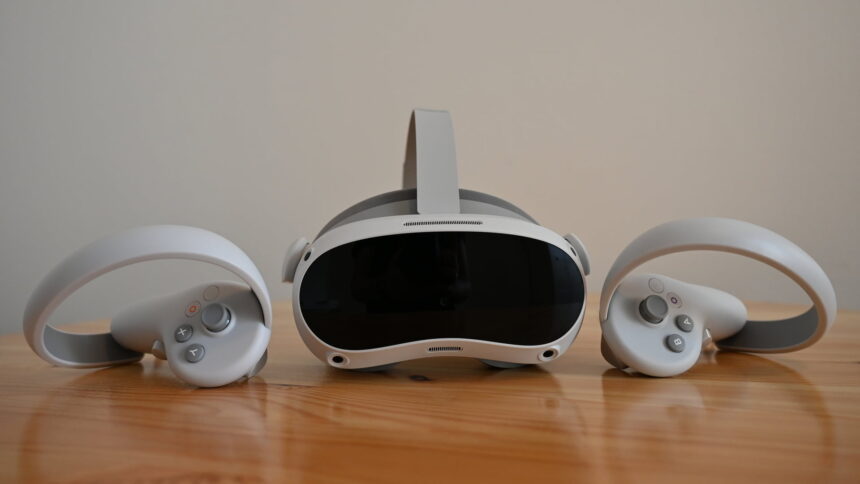
The VR controllers of the Pico 4 work perfectly. The comfort of the headset, on the other hand, leaves a lot to be desired. | Image: MIXED
The advantage of the new brackets is also rather specific. When reloading in VR games like Half-Life: Alyx or The Walking Dead: Saints & Sinners, the tracking rings no longer get in each other's way. On the other hand, the controllers can be uncomfortable for gamers with larger hands in games like Beat Saber. The little finger can get stuck between the handle and the bracket when the VR controllers slide up during fast movements.
The controllers themselves fit perfectly in my hand, and I can reach the analog stick, triggers, and buttons without any problems. There is even a dedicated button on the right controller for screenshots and video recording.
Hand tracking is available, but only if I find the secret access to the developer settings. Under Settings, I have to navigate to the "General" tab and click the "Software Version" item seven times with the trigger. Then the developer menu appears, and I can turn on hand tracking.
Currently, no apps support the Pico hand tracking and there is still a lot of potential for improvement. It is partly inaccurate, the hand movements are often interpreted incorrectly and have to be repeated several times. Ultimately this means that, outside of Pico marketing, Hand tracking for Pico 4 is currently not available.
Sound, software and Pico Store
- The integrated sound is decent.
- There is no jack port for headphones.
- The microphone solution is poor.
- The offerings in the Pico Store grow slowly.
Pico 4 does not have a jack plug for headphones. The speakers are integrated, and their sound is mostly good. However, sound enjoyment does not come up, and occasionally they seem to overdrive.
The dual microphones, on the other hand, are poor. In a test with colleagues, the transmission was unpleasant, like talking from far away through an old telephone.
As for the software, the Meta-inspired interface is largely the same. Those familiar with Quest 2 will find their way around the Pico menu. It works very well too. I haven't run into any bugs so far.
There are currently about 230 VR games and VR apps in the Pico Store. You can find a list behind the link. Over time, more apps will be added. Nevertheless, the offering is far behind that of the Quest Store. At this point, we can only hope for good streaming via cable or Wi-Fi.
Wireless and wired SteamVR streaming
- Wireless streaming works surprisingly well, partly even in the "HD" setting.
- A DisplayPort port is no longer available. Instead, streaming via USB cable is flawless.
Using the Pico Link software on my PC and the VR streaming app on the Pico 4, I can access SteamVR - assuming I have properly configured a WiFi-6 capable router or access point.
There are the settings "Smooth", "SD" and "HD". The "Smooth" setting is probably mainly focused on performance. It works well and smoothly, but the graphics are correspondingly muddy. "HD" on the other hand looks good and runs surprisingly smooth depending on the application. I tested the first 10 minutes of Half-Life: Alyx without stuttering, but Beat Saber on Expert constantly stuttered.
Sound was only a distorted mess - also via link cable. In direct comparison, the sound worked flawlessly with Meta Link and Air Link on Quest 2. This could be a bug because the sound worked well for colleagues when streaming VR with Pico 4.
DisplayPort, which used to be the unique selling point of Pico headsets, is no longer available. However, I can connect a cable via USB 3.0 to my PC via the USB-C port. This is the same streaming variant that Meta Link uses for Quest 2. I used the official cable from Meta, and it ran perfectly.
https://mixed-news.com/


Comments
Post a Comment